Mac menu-bar utility
Screenshot Button
Take a screenshot with your own keyboard shortcut or a click in the menu bar. Your Mac saves it straight to the folder you choose.
- One-time $6.99
- Local screenshots
- 14-day setup help
Apple silicon · macOS 13 or newer · Not yet on sale
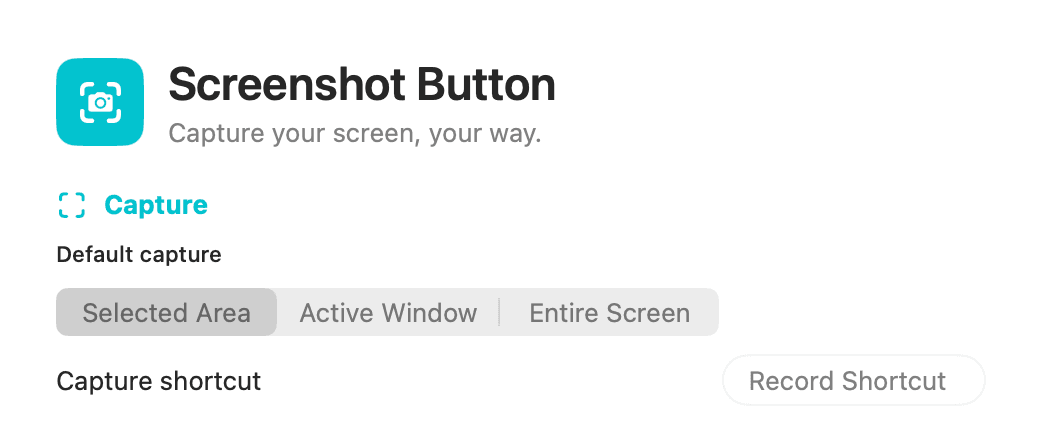
From keypress to file.
- 01
Choose what to capture
Select an area, the active window or the whole screen. Set the one you use most as your default.
- 02
Give it a shortcut
Record your own key combination in Settings, or click the camera in the menu bar. Right-click the camera to switch modes.
- 03
Find the file
Captures go to Pictures/Screenshot Button. Choose another local folder, or copy your screenshot to the clipboard.
Mac edition
One app. Buy once.
A visible capture button and a shortcut you choose. No cloud account, no subscription.
Need an editor, OCR or video recording? Compare alternatives.
For Apple silicon Macs running macOS 13 or newer. Windows is in development and is not included.
Free 1.x updates. 14-day setup help and refund terms. Taxes may apply.
Mac sales are not open yet. No payments are being taken.
Before you buy
Installing the app? Read the setup guide
How do I get the app after checkout?
Stripe returns you to a private download page. Download the Mac ZIP, open it, then drag Screenshot Button.app to Applications. You do not need a Screenshot Button account.
Why is it $6.99?
Screenshot Button is intentionally small. You pay once for a focused Mac utility instead of renting a full screenshot suite.
Where are screenshots saved?
Screenshots are saved locally to Pictures/Screenshot Button by default. You can choose another local folder in Settings, or copy captures to the clipboard.
Which Macs are supported?
The Mac build is for Apple silicon (M-series) Macs running macOS 13 or newer. It needs Screen Recording permission to take screenshots. This edition does not include an Intel or Windows build.
Does it record video or upload to the cloud?
No. The product is deliberately focused on fast local screenshots: selected area, active window, and entire screen.
How does it compare with the built-in Mac screenshot shortcuts?
Your Mac already has free screenshot shortcuts. Screenshot Button gives you a camera in the menu bar and lets you assign one shortcut to your preferred capture mode.
What if it doesn't work on my Mac?
Contact support within 14 days. We will help with setup, Screen Recording permission, and refund the purchase if Screenshot Button still does not work for your Mac.